Overview
I wanted to take a look at what building a web app in Rust is like. I am going to create a simple todo app, which I might later expand to be more of a kanban board. Taking some inspiration from another one of NoBoilerplate’s videos; I plan on using Poem for my web framework, with sqlx to interface with MySQL, and htmx for the frontend. The code for this project can be found here on github.
Tokio
Since we will be creating rest apis and connecting to a sql server, we will need to be able to write asynchronous code. While rust comes with async/await syntax, and it’s even pretty similar to JS, async in rust isn’t quite useable out of the box. Rust provides some building blocks, but it requires you to build additional logic on top to manage which code should run when, this is called an asynchronous runtime. While you could build your own; I’ve decided to use Tokio instead, which appears to be the most popular runtime.
Tokio is a rust crate that provides an asynchronous runtime, as well as some async IO and parallelism. The most basic usage is too simply add #[tokio::main] to your main fn, and to make it asynchronous. Note that without tokio (or the like), the main fn cannot be async in rust.
#[tokio::main]
async fn main() {
    // Async code here
}
Eyre
Rust can have a lot of different Result and Error types, as many different functions and crates will create their own. It can be fairly annoying to deal with all of these deuplicate, or near duplicate, types; so instead I will be using the Eyre crate to provide more unified error handling. Additionally the color-eyre crate provides more rich console output for runtime errors.
Hello Poem
Now we can actually get started building some APIs with Poem. Note we are also using the poem-openapi crate, to give us some nice api documentation. To create our first endpoint we just need to make a blank struct with a simple impl block, like so:
struct Api;

#[OpenApi]
impl Api {
    #[oai(path = "/hello/:name", method = "get")]
    async fn hello_world(&self, pool: Data<&MySqlPool>, Path(name): Path<String>) -> Result<Json<String>> {
        Ok(Json(format!("Hello {name}!")))
    }
}
Here we are simply taking a name from the path, and then returning a nice greeting back as json. Now all we have to do is update our main function with some setup.
let api_service = OpenApiService::new(Api, "Manage Todos", "1.0")
    .server("http://localhost:3000/api");
let ui = api_service.openapi_explorer();
let app = Route::new()
    .nest("/api", api_service)
    .nest("/", ui);

poem::Server::new(TcpListener::bind("127.0.0.1:3000"))
    .run(app)
    .await?;
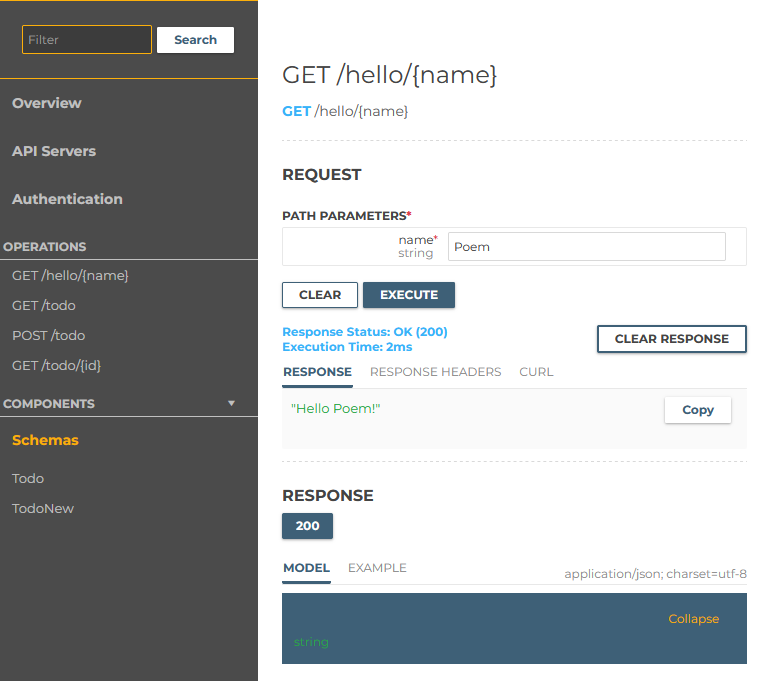
Here we are setting up a server to run on localhost port 3000, with our apis under the ‘/api’ path and our API explorer on the root path. Now we can open up the api explorer and test out our hello world api.
sqlx
Let’s now add a database and create some todos! I will be using a MySQL server for this, via docker compose. Then using sqlx to both manage the schema and to connect my server to the db. Not only does sqlx allow us to connect to sql dbs and run queries, it can also do type checking at compile time! The compiler will actually connect to your db and confirm that the tables and types match up, and will throw errors if it doesn’t. This will allow us to use the power of rust to make sure all of our sql queries are valid too.
sqlx comes with some CLI tools allowing us to create to manage and update our sql schema. We can add our initial schema by creating a migration with this command sqlx migrate add <migration name>. This will create a new folder /migrations with a blank sql file in it. We can then add a table to it:
CREATE TABLE
  `todo` (
    `id` int unsigned NOT NULL AUTO_INCREMENT,
    `created_at` timestamp NOT NULL DEFAULT CURRENT_TIMESTAMP,
    `updated_at` timestamp NOT NULL DEFAULT CURRENT_TIMESTAMP,
    `title` varchar(255) NOT NULL,
    `description` varchar(512) DEFAULT NULL,
    PRIMARY KEY (`id`)
  )
Then to deploy this change to our db we can use the command sqlx migrate run. When we need to update our schema we can just create another migrate script and add whatever changes we need there.
Let’s now add a matching struct in our rust code:
#[derive(Clone, Debug, Deserialize, Object, Serialize)]
struct Todo {
    id: u64,
    title: String,
    description: Option<String>,
    created_at: DateTime<Local>,
    updated_at: DateTime<Local>,
}
Note that we are deriving Serialize and Deserialize from serde, this allows us to serialize the data into JSON when we return it from our api.
Hooking it all up
We can now create some endpoints to get and create todos in our db. First we have to create our sql connection and make sure we can use it from our poem endpoints. For that we need to update our main function to create a MySqlPool, which allows us to connect to the db, and then to pass that to our poem endpoints.
let pool =
	    MySqlPool::connect("mysql://myuser:mypassword@localhost/mydatabase").await?;
...
...
let app = Route::new()
        .nest("/api", api_service)
        .nest("/", ui)
        .data(pool);
We can then make a endpoint to get a todo by id. We use the sqlx query_as! macro to preform our query, and if something goes wrong we tell poem to return an internal server error.
#[oai(path = "/todo/:id", method = "get")]
async fn get_todo(&self, pool: Data<&MySqlPool>, Path(id): Path<u64>) -> Result<Json<Todo>> {
    let todo = sqlx::query_as!(
        Todo,
        "SELECT * FROM todo WHERE id = ?",
        id
    )
    .fetch_one(pool.0)
    .await
    .map_err(InternalServerError)?;

    Ok(Json(todo))
}
I mentioned that sqlx will have the rust compiler check types, lets test that out. If we change the created_at field of our struct to created_on we would get the following error:
error[E0560]: struct `Todo` has no field named `created_at`
  --> src/main.rs:60:20
   |
60 |           let todo = sqlx::query_as!(
   |  ____________________^
61 | |             Todo,
62 | |             "SELECT * FROM todo WHERE id = ?",
63 | |             id
64 | |         )
   | |_________^ help: a field with a similar name exists: `created_on`
The compiler tells as of the mismatch! It will even let us know that the there is a similarly named field. We now know right where the issue is and can make changes to the struct or sql schema to have the names match up.
Wrapping up
That all we really need to know to get some basic restful endpoints up and running in rust. Note that I have also created endpoints to create a new todo, and to retrieve all todos. That can be found in the repository. In my next post we will be creating a frontend for our todo app using htmx.